Pair MSense wristbands
MSense wristbands are identified by their BLE name (e.g. MSense4PPG-8NR1S)
and connected by UUID / MAC address. Pairing is telling PLASMA which
name ↔ address pairs to look for. It lives in Configuration → "MSense
wristbands".
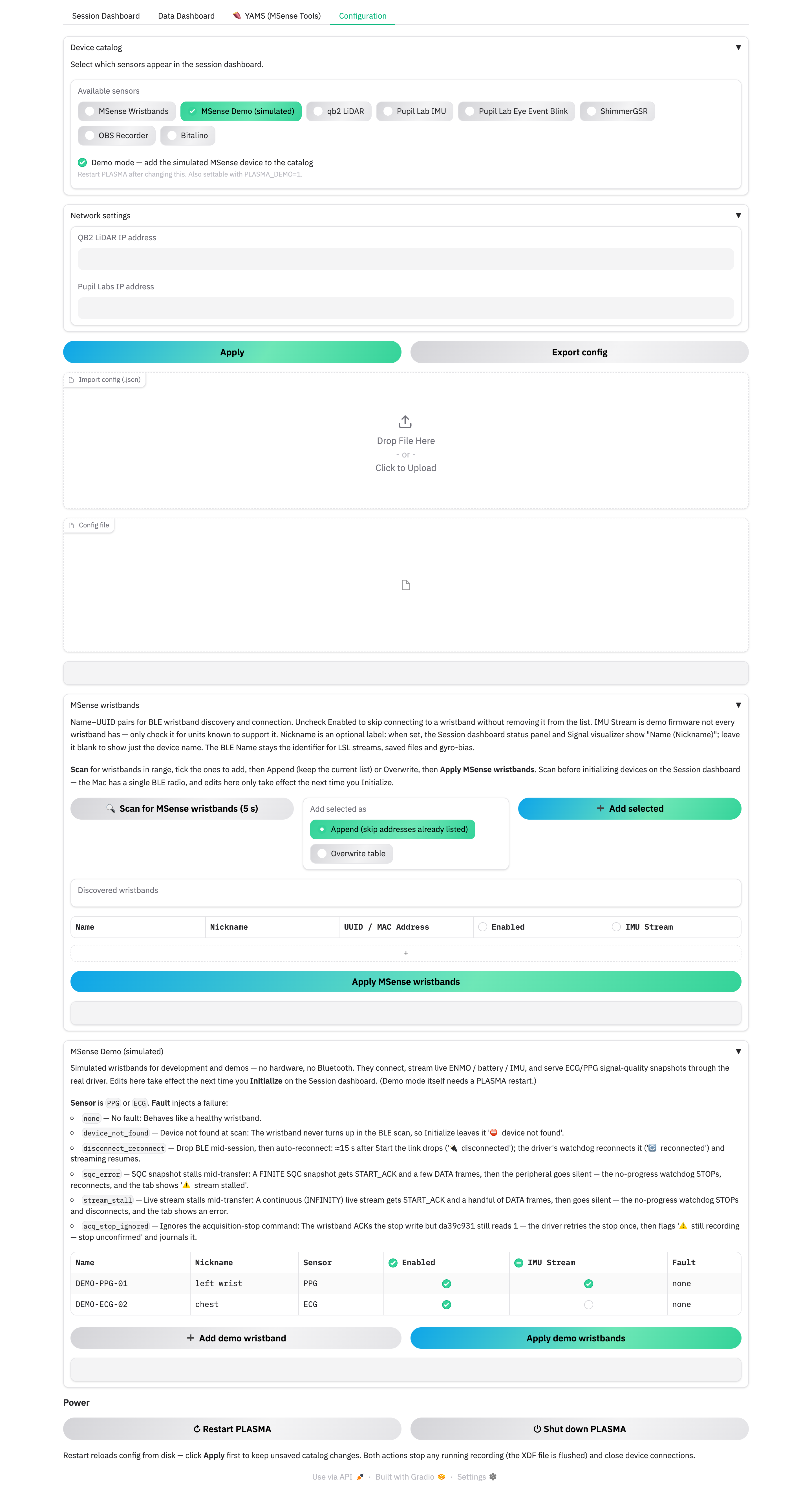
Scan and add
Scan before you Initialize
The Mac has a single BLE radio. Do all scanning here before you click Initialize on the Session Dashboard — a scan while devices are connected will fail or disrupt the session.
- Turn the wristband on and make sure it's advertising and in range.
- Click 🔍 Scan for MSense wristbands (5 s).
- In Discovered wristbands, tick the units you want.
- Choose how to add them:
- Append (skip addresses already listed) — keeps your existing rows (default).
- Overwrite table — replaces the whole list with the scan results.
- Click ➕ Add selected. A row appears with the advertised Name, an empty Nickname, Enabled on, and IMU Stream off.
- Click Apply MSense wristbands to save. "Saved — n/N MSense wristband(s) enabled" confirms it.
Edits here take effect the next time you click Initialize on the Session Dashboard.
The table columns
| Column | Meaning |
|---|---|
| Name | The BLE advertised name. Used to label the LSL stream and the saved files. Two wristbands may share a Name — the address below is the identity. |
| Nickname | Optional, display-only. Shown as "Name (Nickname)" on the dashboard and in the signal viewer. Use it for "left wrist" / "chest" — and to tell apart two wristbands that share a Name. |
| UUID / MAC Address | The connection address (a UUID on macOS, a MAC elsewhere). This is the identity: each wristband's status, gyro-bias record and per-device state is keyed by it. Listing the same address on two enabled rows is flagged on Apply (only the last is used). |
| Enabled | Untick to park a wristband — kept in the list, skipped at Initialize. |
| IMU Stream | Tick only for units whose firmware has the demo IMU characteristic. Ticking it on a unit that lacks it just logs a warning at Start. |
You can also edit cells directly and add / delete rows in the table, then Apply.
Pairing without a scan
If the wristband is mounted over USB you can pair from YAMS → 📋 Devices:
- UUID extractor — pick the mounted drive, 🔧 Read UUID reads the
address from the wristband's
uuid.txt, type a serial / name, 📝 Add to wristband list. - Import device_info.json — load a
{serial: MAC}map exported elsewhere.
Both write straight into the same saved wristband list.
Next: Run a session.